
PLANNING ROUTES EFFICIENTLY WITH PTV IN TICOM
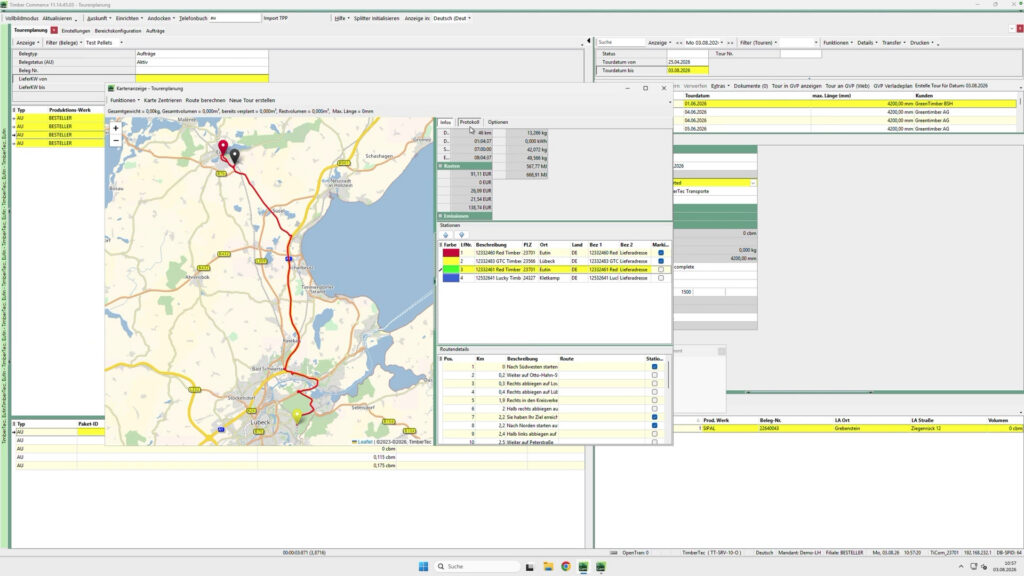
See for yourself how you can visualize customers, orders, and routes directly on a digital map and plan routes efficiently. With the PTV integration in TiCom, you can use up-to-date online maps, calculate optimal routes, and create routes directly from your ERP system. In a live demo, we’ll show you how to use the solution in your day-to-day operations.
Date: August 18, 2026, from 10:00 a.m. to 10:30 a.m.
Location: In any standard web browser and on mobile devices via the Teams app
Click here or on the button below and register for our webinar!
Language: German
Participants in this webinar will have the opportunity to implement the solution presented at discounted introductory rates. More information will be provided during the webinar.
Many companies plan routes on a daily basis under significant time pressure. Often, up-to-date map information is lacking, or routes are put together using different systems and lists. This results in unnecessary planning effort, longer processing times, and confusing workflows. With the PTV integration in TiCom, you can visualize customers, orders, and routes directly on a digital map. The solution supports you in route planning, calculates optimal routes, and provides up-to-date distance data for reliable planning.
Plan trips directly on the map, calculate optimal routes, and import the results directly into TiCom.
DIGITAL MAP AND ITINERARY PLANNING
The PTV integration adds a modern mapping and routing solution to TiCom. Addresses, customers, and orders can be displayed on a map directly from TiCom. Routes can be planned and optimized interactively and implemented immediately.
This way, you’ll always have an up-to-date overview of your routes and can make informed decisions when planning.

Up-to-date online maps directly in TiCom

Interactive Route Planning via Drag & Drop

Automatic Route and Distance Calculation

Overview of Customers, Quotes, and Orders on the Map

Viewing and Using the Maps for All Employees

Live demo, including a Q&A session
Focus in the webinar
In this webinar, we'll show you through a live demo:
- How customers and orders are displayed directly on a map.
- How to Plan and Optimize Routes Interactively.
- How automatic route calculations work,
- How current map and traffic data are used.
- How the results are imported directly into TiCom.
Of course, our experts will be happy to answer your questions afterward.
Register for the webinar now
Click here, or on the button below, to register for the webinar on August 18, 2026.
All registered participants will receive the webinar recording and the presentation given during the event.