

Webinar

MOBILE FIELD SERVICE WITH TICOM CONNECT

See for yourself how TiCom Connect lets you access customer data, sales information, and visit reports right on your smartphone. Prepare for customer appointments in a targeted way, keep track of relevant information, and document customer visits right on the spot. Through a live demo, we’ll show you how TiCom Connect supports field staff in their day-to-day work and streamlines communication between field and office staff.

Date: September 15, 2026, from 10:00 a.m. to 10:30 a.m.

Location: In any standard web browser and on mobile devices via the Teams app

Click here or on the button below and register for our webinar!

Language: German

Much of the information needed for a successful customer meeting is stored in the ERP system: contact persons, open items, quotes, orders, and sales data. For field sales representatives, however, accessing this information while on the go is often cumbersome or only possible to a limited extent. At the same time, customer visits must be documented and information must be passed on to the office staff.

All contact information, including additional details specifically for the sales department.

Open items, quotes, and individual orders.

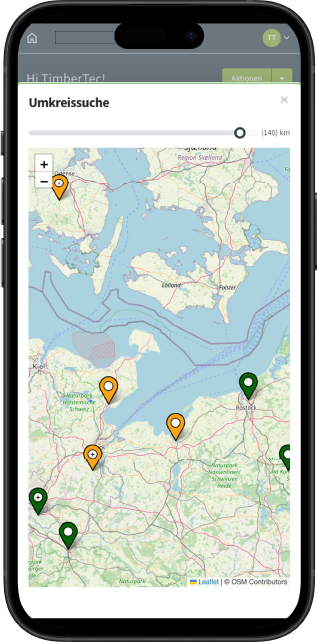
All customers in the location-based radius.

Direct sending of emails and visit reports using speech-to-text.

CUSTOMER INFORMATION RIGHT WHERE IT'S NEEDED

With TiCom Connect, important customer and sales information is available on the go via smartphone. Field sales representatives can search for specific customers, access information right before an appointment, find customers in the vicinity, and create visit reports directly on site. This ensures that everyone involved stays up to date, and customer service becomes simpler and more structured.

Mobile sales support

Customer Lookup: All relevant contact information and additional customer details specifically for the sales team are available on mobile devices.

Sales Information: Open items, quotes, orders, and other sales-related information can be viewed directly by the customer.

Nearby Search: Find customers within a location-based radius and use the map view to plan your visits effectively.

Visit Reports and Emails: Document customer visits directly on-site and easily forward information to the office staff—via speech-to-text, if desired.

Reporting Deadlines at a Glance: Relevant reporting deadlines are displayed automatically. This also makes it possible to specifically identify customers who have not been visited for an extended period of time.

Documents Available on the Go: Access PDF documents such as quotes, orders, or invoices directly in the app, so you always have important documents at your fingertips, even when you're on the go.

Focus in the webinar

In this webinar, we'll show you through a live demo:


  • How Field Sales Representatives Access Customer Data Directly on Their Smartphones.
  • What sales information is available to the customer.
  • How customers are found through the integrated map and nearby search features.
  • How visit reports are created on-site and forwarded to the office staff.
  • How reporting deadlines help you keep track of customer contacts in a timely manner.
  • How to access documents such as quotes, orders, or invoices on a mobile device.


Of course, our experts will be happy to answer your questions afterward.

Register for the webinar now

Click here, or on the button below, to register for the webinar on September 15, 2026.

All registered participants will receive the webinar recording and the presentation given during the event.